Talk to Me, Goose!
Redesigning an AI-assisted communication tool for individuals living with ALS - making voice preservation more transparent, controllable, and expressive without sacrificing speed.
This wasn't just a usability problem. It was an agency problem.
Talk to Me, Goose! is a voice and identity preservation tool built for individuals living with ALS - a progressive neurological disease that gradually removes the ability to speak while leaving thought and identity fully intact. Our client, David Betts, built the application after his own ALS diagnosis. Since its creation, it has received the 2026 Zero Project Award and coverage across several local news stations.
David approached our team to evaluate and improve the system. What our research revealed was that the core issues ran deeper than surface-level usability. Breakdowns stemmed from unclear system behavior, loss of user control, and interface ambiguity that caused users to hesitate, second-guess, or avoid features altogether.
Our team set out to redesign Talk to Me, Goose! around a central direction: Safe and Confident Interaction. The result is a redesigned interface centered on structured AI assistance modes that give users clearer, more predictable control over how AI is applied to their communication.
Understanding the existing experience
We built a comprehensive picture of the problem space through a multi-method research strategy before touching any interface.
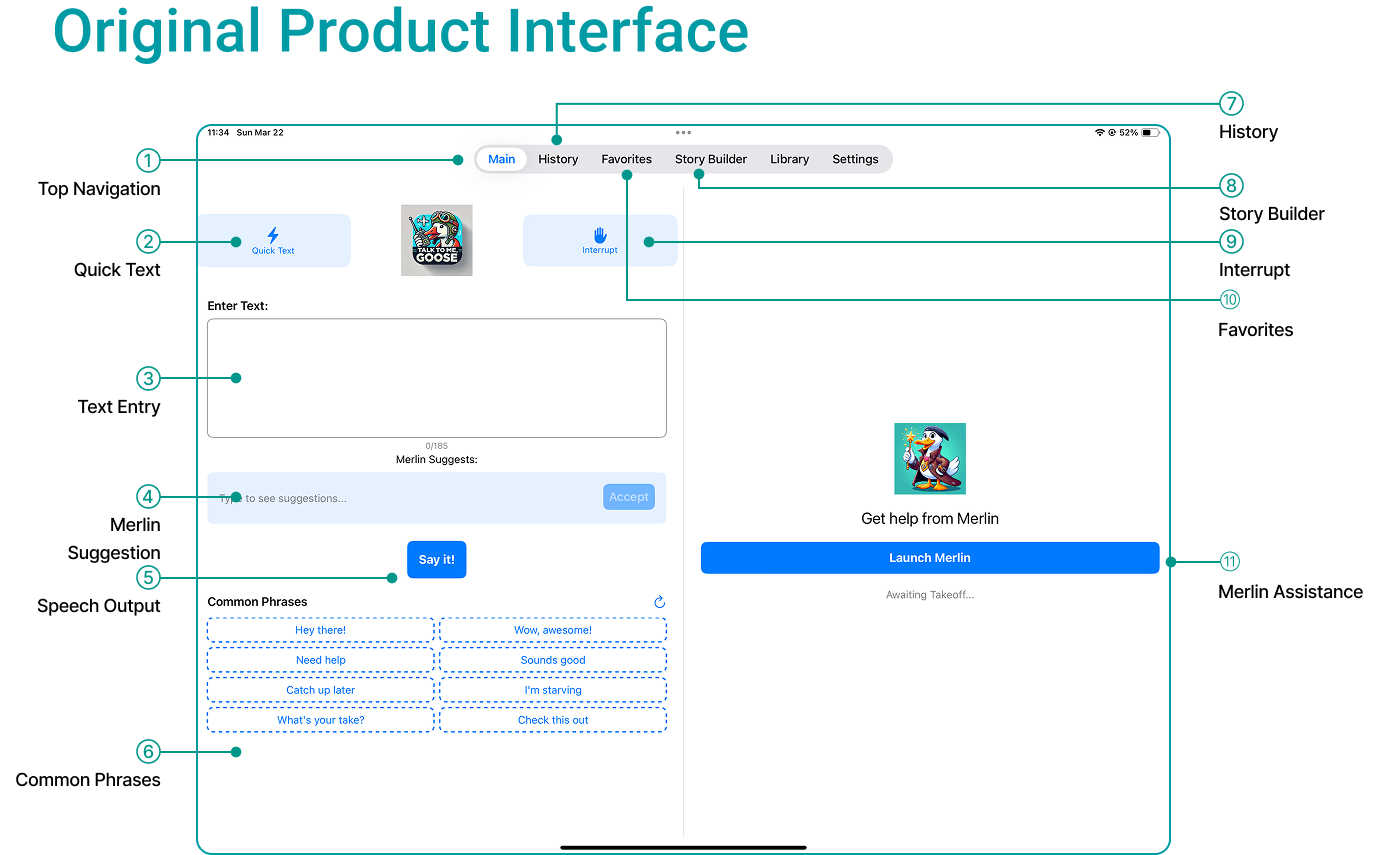
The original Talk to Me, Goose! interface - annotated with the 11 core functional areas our team evaluated.
Secondary Research - Key Themes
Agency & Authorship
AAC systems must enhance expression without overriding user intent. Automation should streamline communication, not replace authorship.
Cognitive Load & Friction
Small usability barriers accumulate into fatigue and withdrawal. System management often takes attention away from the actual act of communicating.
Voice & Identity
Voice and tone are central to identity and relational connection. Poorly designed systems can undermine dignity even if functionally effective.
AI Visibility
Few tools make AI behavior transparent and controllable. Switching costs and institutional trust strongly influence adoption and long-term use.
Think-Aloud Testing - Key Themes
Ten first-time participants tested the current app in simulated ALS conditions (minimizing typing and touch effort). Three patterns emerged consistently:
Unclear mental models
Participants frequently asked "What is Merlin supposed to do?" Several were unsure whether accepting a suggestion would replace or append their text.
Desire for granular control
Users wanted to modify tone or parts of suggestions without rewriting everything. Quick Text vs Common Phrases caused confusion due to similar visual structure.
Navigation friction
Two Merlin entry points created cognitive overload. Voice sliders lacked live preview, making adjustments feel unpredictable.
Hesitation under uncertainty
In Story Builder, users saw only a "Start Over" button - unclear whether it would erase everything. Fear of losing work made them stop exploring.
4 Synthesis Insights
Merlin doesn't capture users' intended meaning
When users type something like "help me up plz," Merlin expands it into "I'm having trouble getting out of my chair" - already assuming context. The user might have meant emotional support or homework help. System outputs need to stay grounded in actual intent.
Low system clarity reduces exploration and confidence
Users hesitate to use features when they're unsure how to undo, interrupt, or recover from mistakes. When system behaviors aren't transparent, users become cautious and stop experimenting altogether.
AI help is valued but users want to stay in charge
Participants consistently modified portions of Merlin-generated text rather than accepting suggestions wholesale. The binary accept/dismiss model didn't match how people actually wanted to interact - they needed granular refinement, not all-or-nothing control.
Unclear feedback and overlapping features create hesitation
No visual confirmation when tapping Quick Text or Common Phrases. Merlin appears in two places with different behavior. Users spend time decoding the interface instead of communicating.
Restructuring around control and clarity
The mid-fi prototype translated Round 1 findings into a restructured interface. We reorganized the screen around two main areas - a speech panel and a modular support dashboard - and introduced three key features.
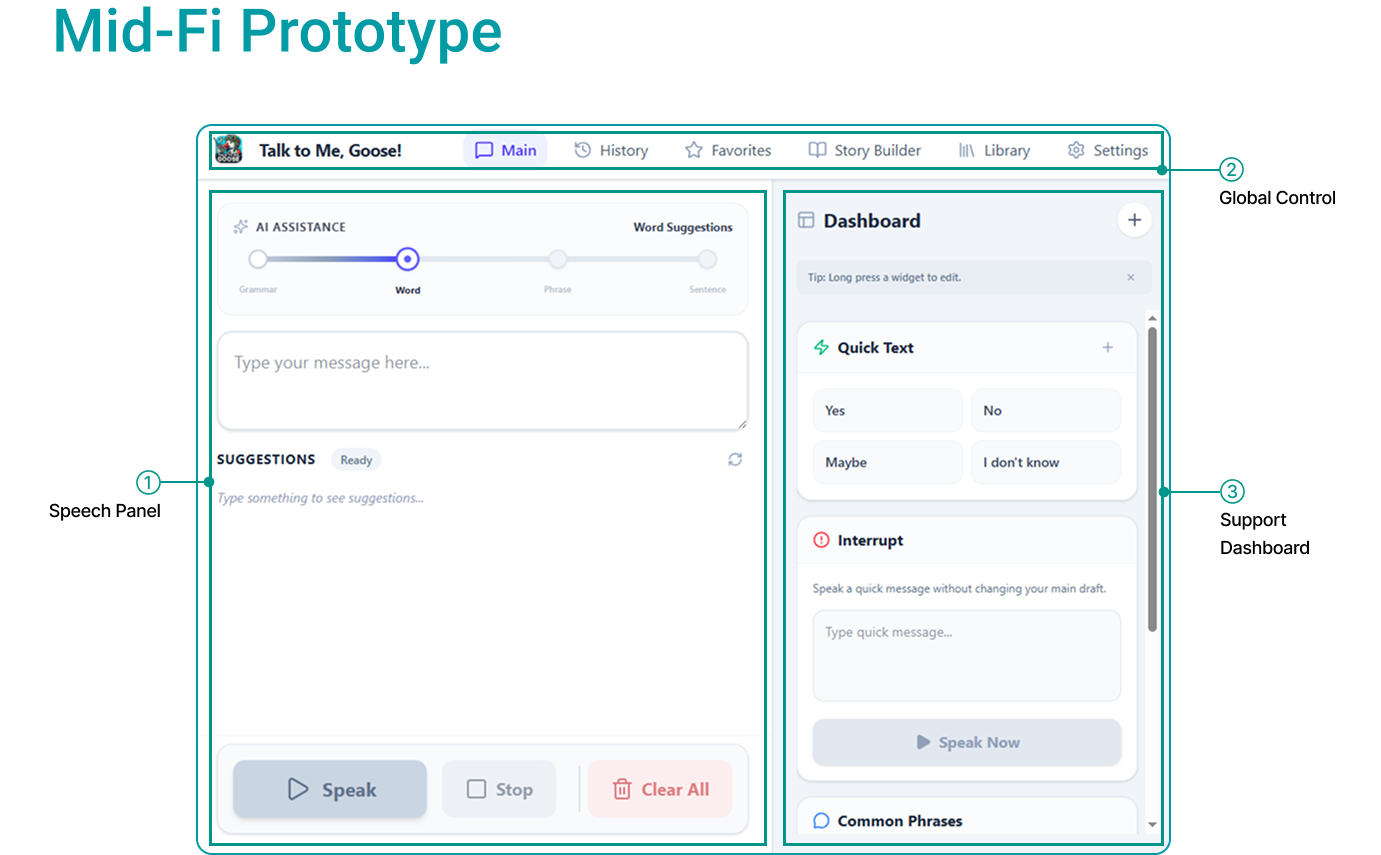
Mid-fi prototype: split-screen layout with speech panel (left) and modular dashboard (right).
Modular Dashboard
Instead of presenting every tool as a fixed element, the right panel became a customizable space. Users could add, remove, reorder, and configure Quick Text, Common Phrases, Interrupt, History, and Favorites - so the tools available during communication were the ones they actually needed.
Adjustable AI Involvement Slider
A slider let users choose how much AI should assist: Grammar (typo fixes only), Word (next-word prediction), Phrase (sentence completion), or Full Sentence (full expansion from minimal input). In Full mode, context and mood settings shaped the tone of the output.
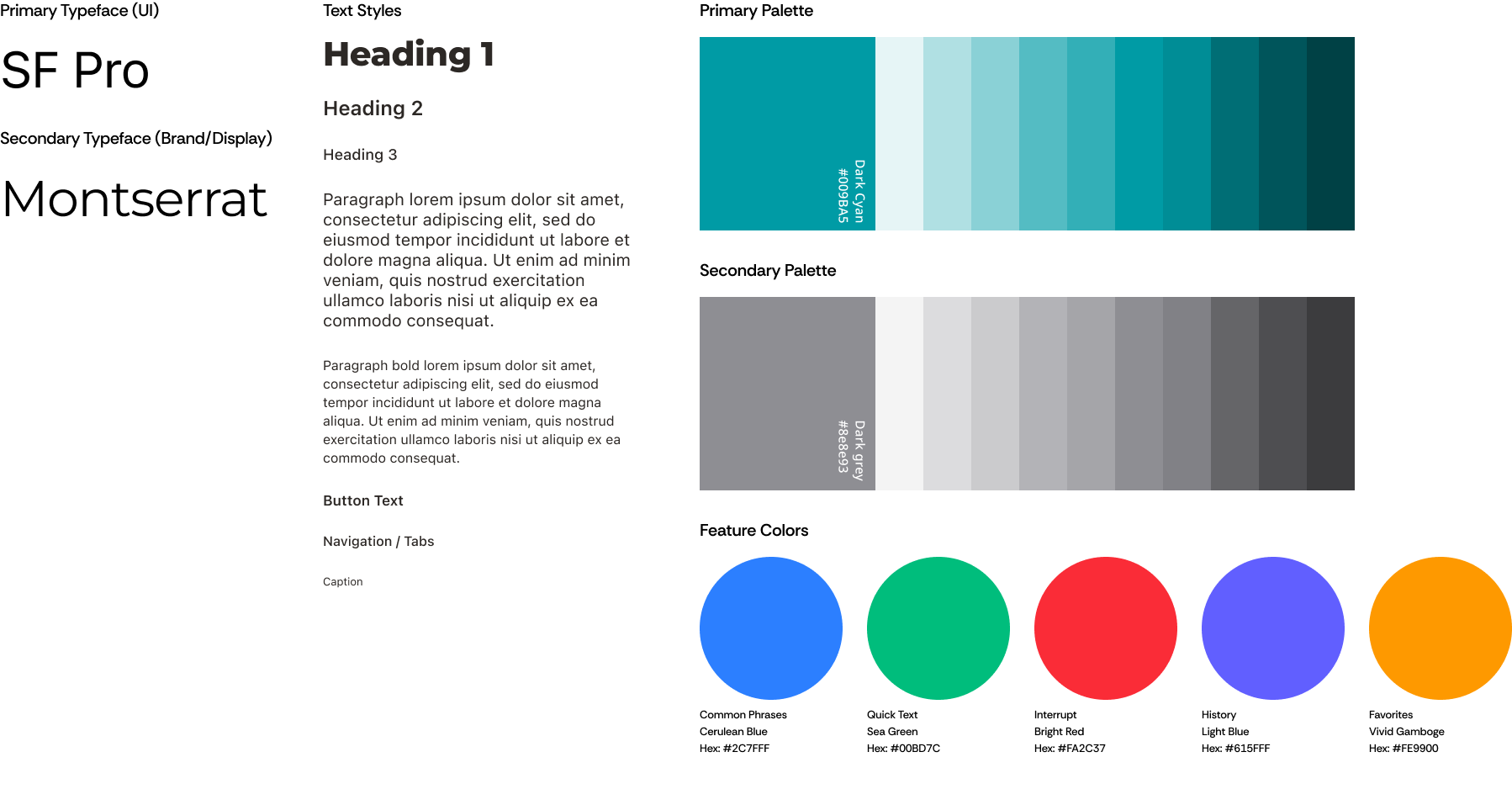
Design system - typefaces, color palette, and feature color assignments.
Visible States & Recovery Controls
Each word highlights as it's spoken aloud. "Thinking" and "Ready" labels show system status. A universal Undo button with a dynamic label ("Undo: Clear text") lets users recover from any mistake without hunting through menus. Pause/Play, Stop, and Clear All give full playback control.
Testing with 12 Participants - What We Learned
Overall direction confirmed
Users found the restructured layout clearer and felt more in control. The split-screen separation of composition from support tools was well-received.
AI levels lacked a clear mental model
The Grammar → Word → Phrase → Sentence levels felt arbitrary. Users couldn't predict what each level would actually do to their text, which caused hesitation rather than confidence.
More options created more overload
Users requested mood and context controls, but when given more components on screen simultaneously, some felt overwhelmed. The right balance was between flexibility and simplicity.
Design Decisions for Round 3
A cohesive system built around structured AI assistance
The final prototype brought together speech composition, AI-supported message creation, reusable communication tools, and guided onboarding into one cohesive experience - validated with 2 ALS users and 2 expert speech-language pathologists.
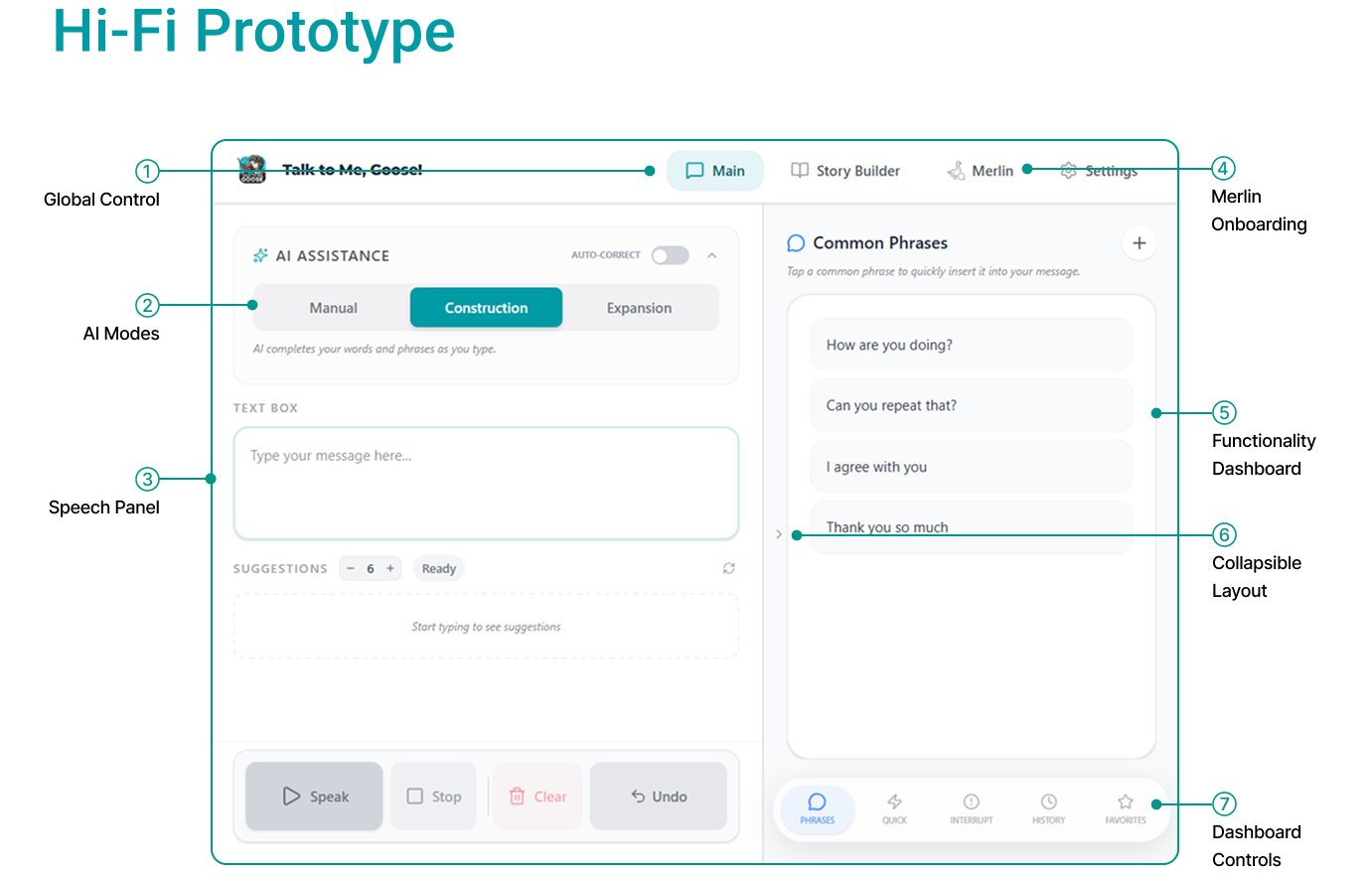
Hi-fi prototype overview: Global controls, AI mode selector, speech panel, Merlin onboarding, and collapsible dashboard.
Three AI Modes
Instead of a slider, we replaced levels with three named modes - each with a clear, distinct mental model and visual identity.
Full authorship, no AI intervention
Users type freely without any AI suggestions. The panel acts as an open text canvas with autocorrect available as a lightweight opt-in toggle. For users who know exactly what they want to say.
Build a message step by step
AI suggestions are added to the end of what the user has already typed - extending, not replacing. Supports users who type slowly or need help finishing a thought while staying in control of the direction.
Short input → expressive full message
Users type a very short phrase ("water pls") and the system generates a complete message. Unlike Construction, the AI suggestion replaces the short input. Shaped by context and mood tags the user controls.
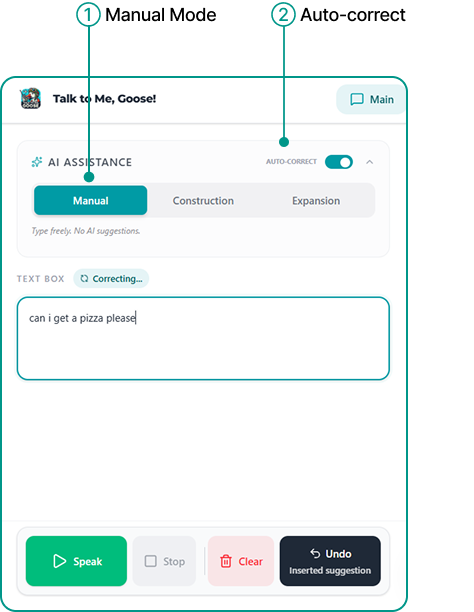
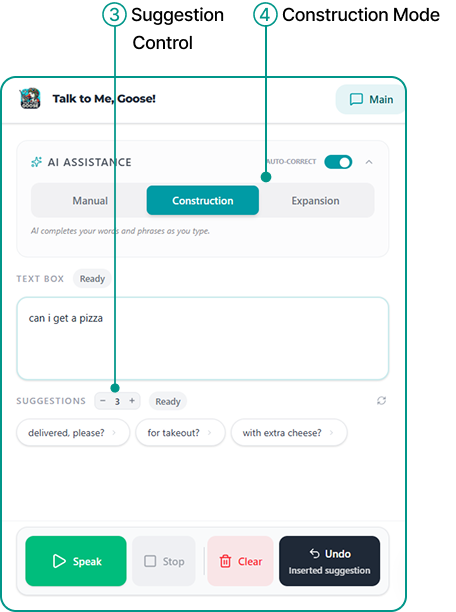
All three AI modes - Manual, Construction, and Expansion - each with a distinct interaction model.
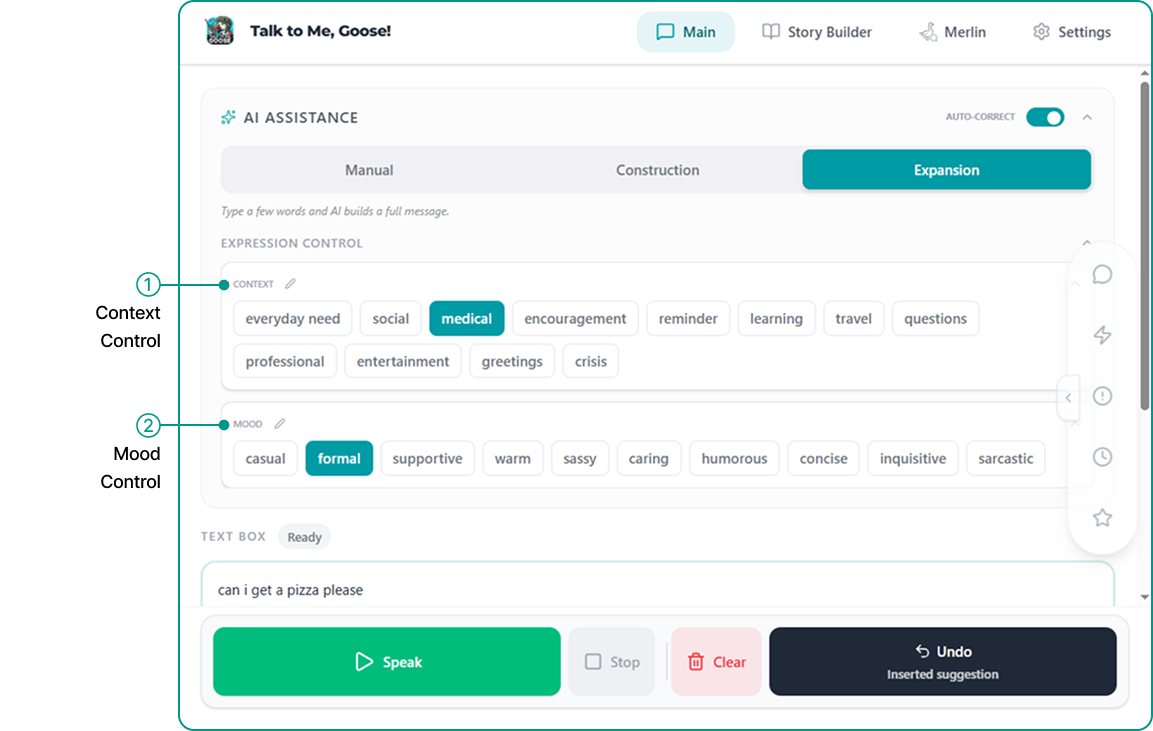
Expansion Mode: Context & Mood
In Expansion Mode, users can add context tags (what's the situation?) and mood tags (what's the tone?) to shape the AI output. Tags are editable, removable, and reorderable so the system adapts to communication habits over time.
Example: type "water pls" + select humorous mood → "Could I get some high-quality H₂O before I officially turn into a human raisin?"
Expansion Mode with context and mood tag controls.
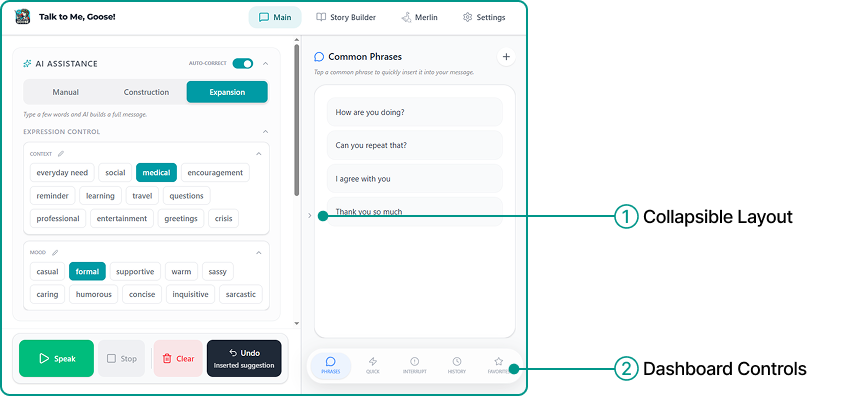
Dashboard & Collapsible Layout
The right panel holds tools for faster, more flexible communication - Common Phrases, Quick Text, Interrupt, History, and Favorites. The entire panel is collapsible, giving users a larger, focused composition space when they don't need the shortcuts.
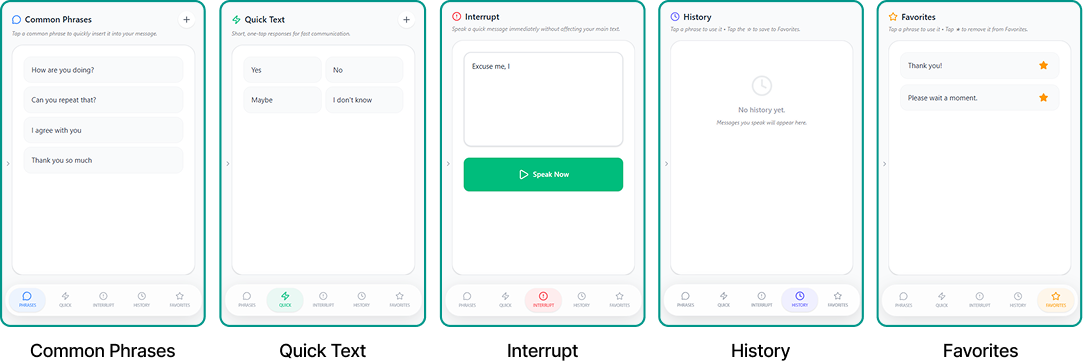
Dashboard with all five communication widgets - Common Phrases, Quick Text, Interrupt, History, and Favorites.
Guided Onboarding with Merlin
First-time users are walked through the interface by Merlin step by step - learning not just where tools are located, but when and why they'd use them. The onboarding is re-enterable, so users can return to it as they grow more comfortable with advanced features.
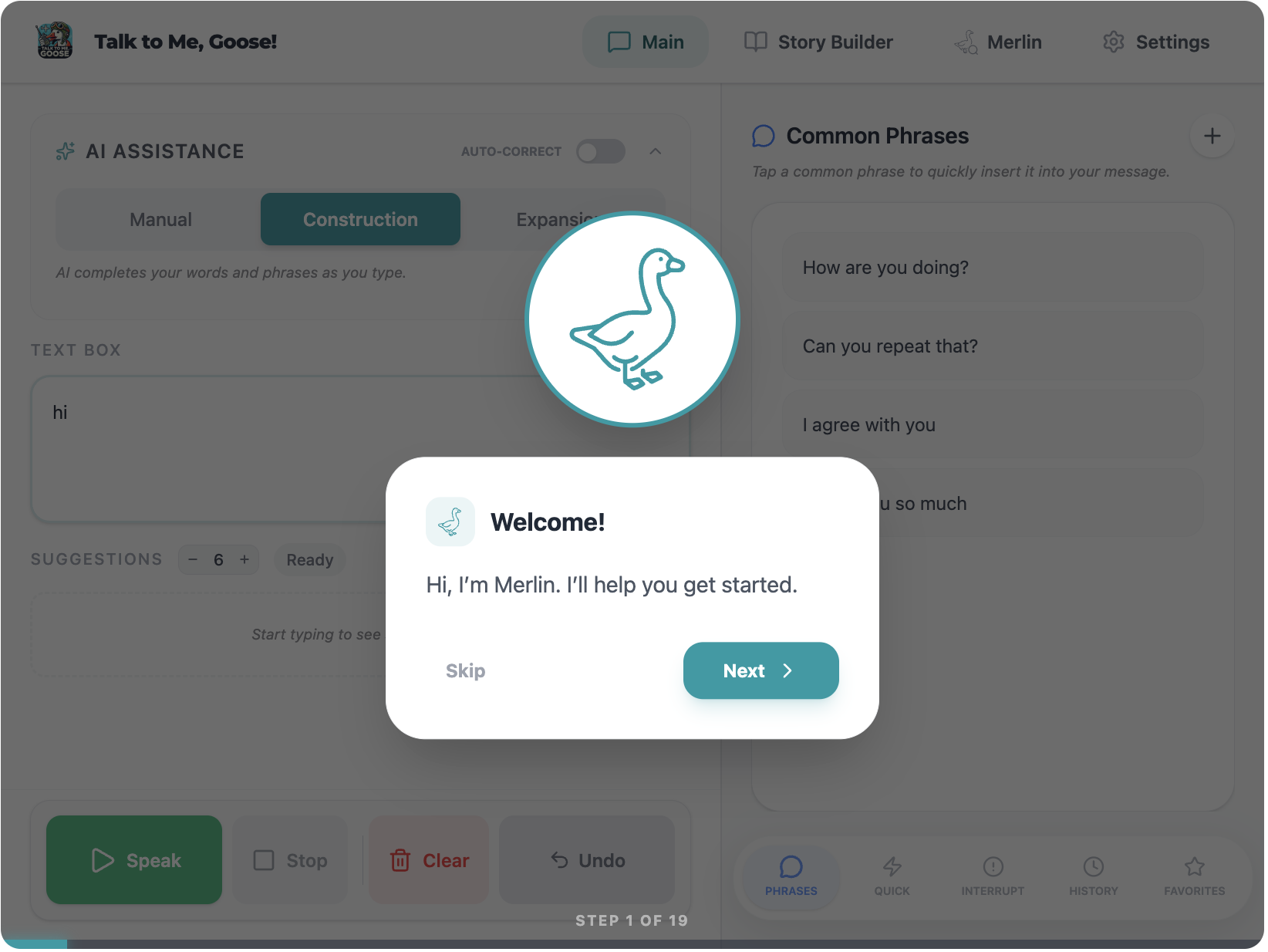
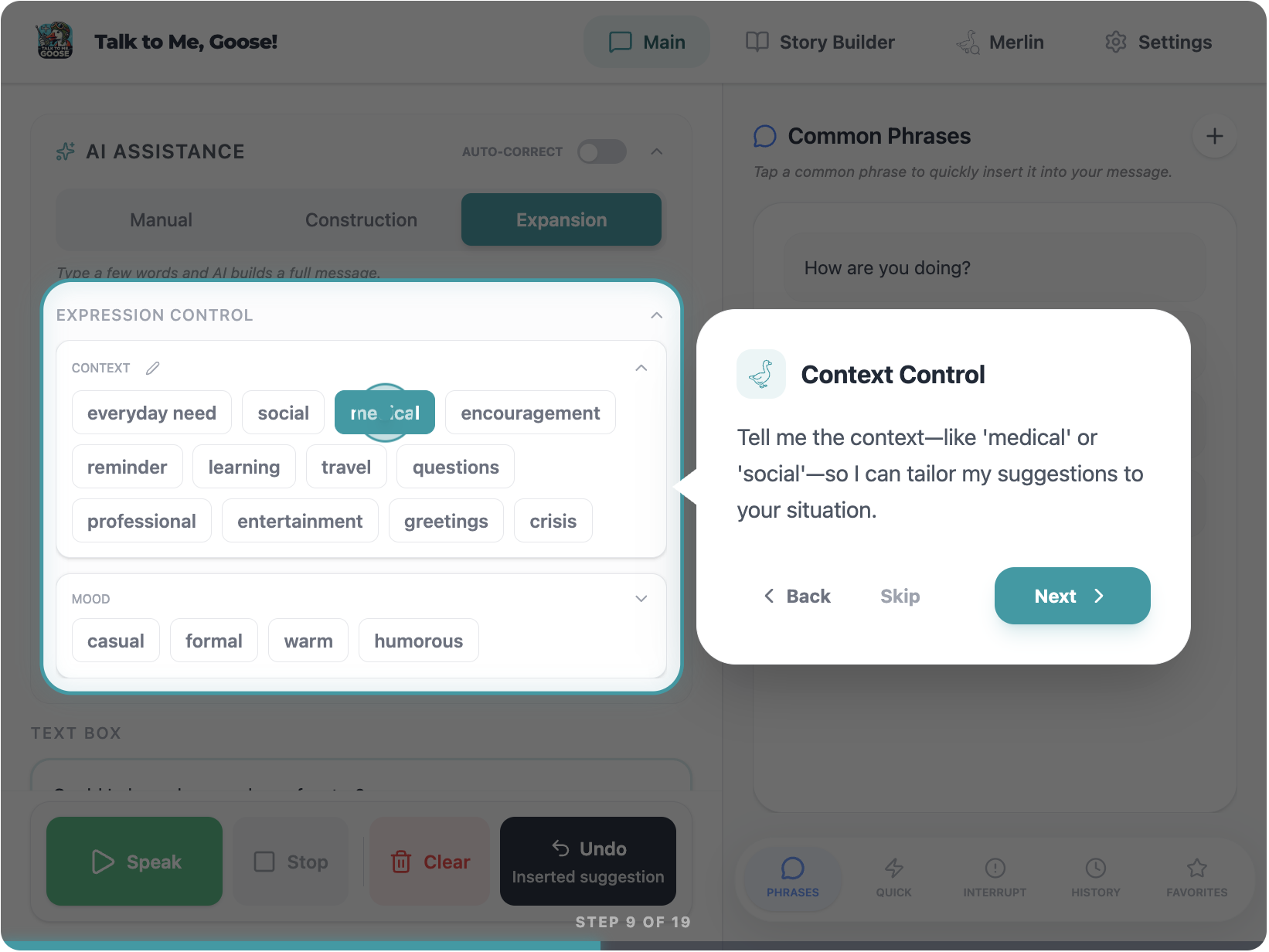
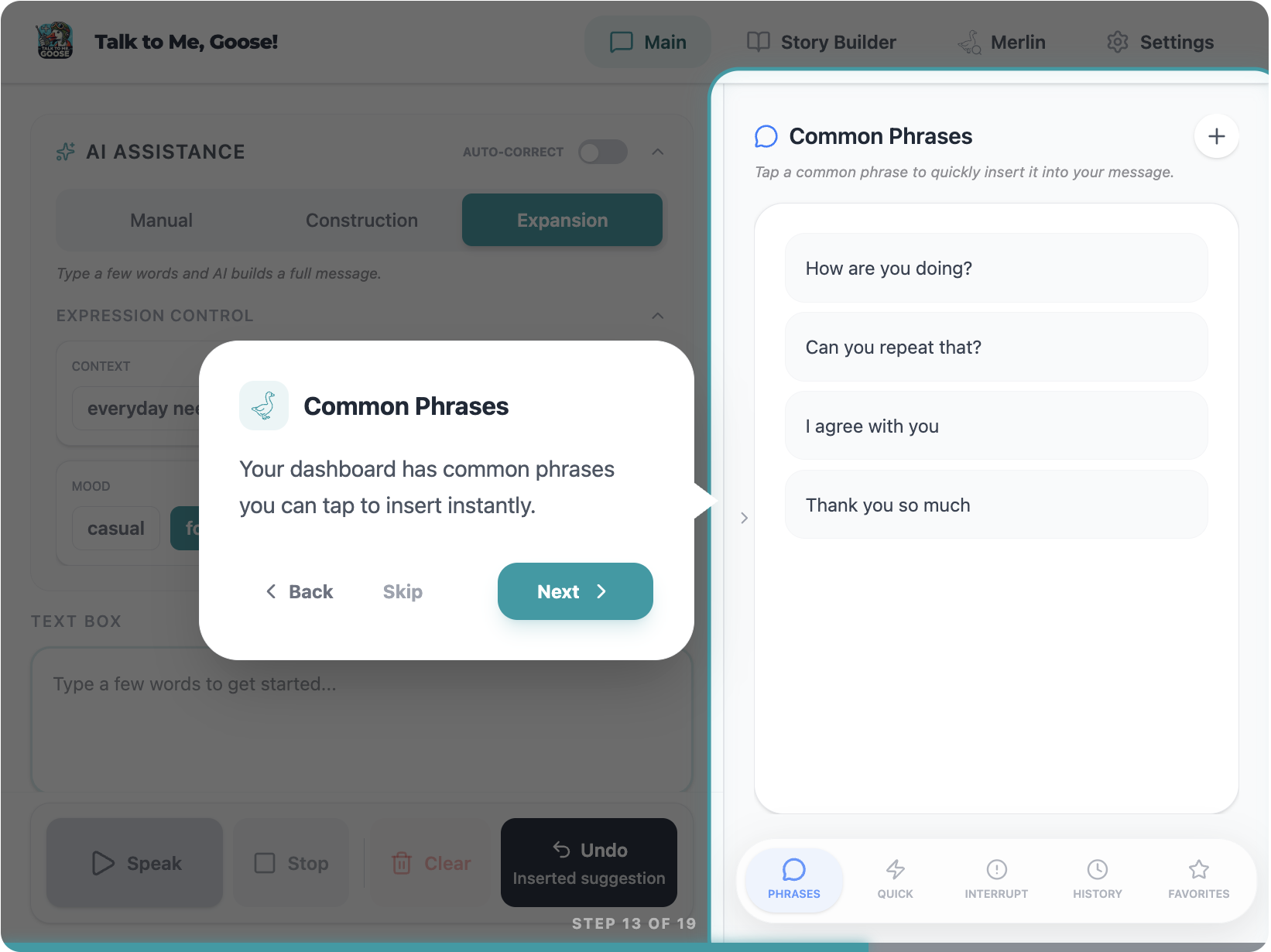
Step-by-step onboarding: welcome introduction, context control explanation, and dashboard orientation.
100% unassisted completion - without sacrificing expressivity
Final UX validation testing included 2 participants with diagnosed ALS and 2 expert speech-language pathologists. Sessions used a Zoom chat-based think-aloud protocol to reduce speech burden. Quantitative metrics were collected alongside qualitative feedback for the first time.
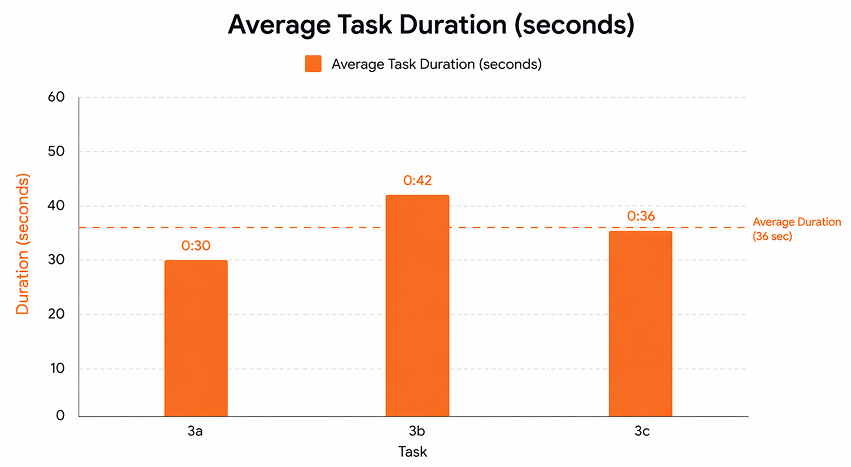
Average task duration across AI modes - 36 seconds mean completion time.
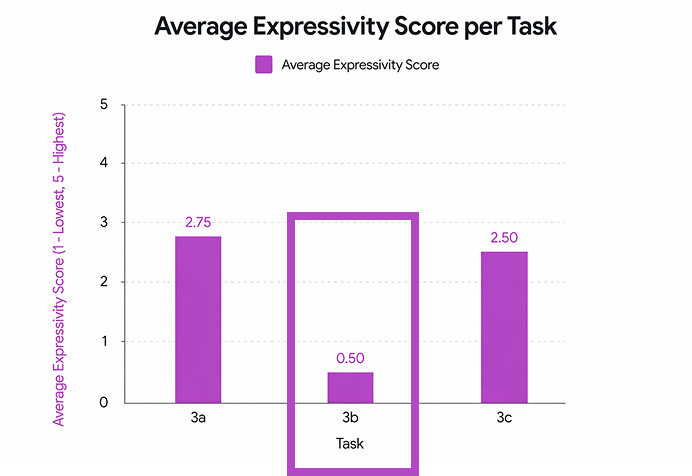
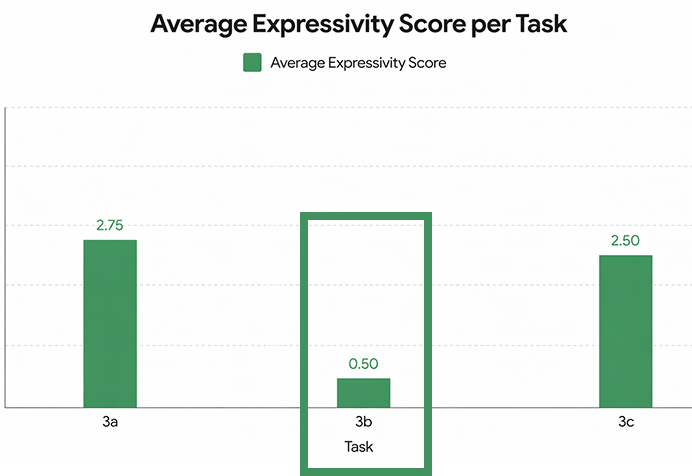
Average expressivity scores per task - Manual and Expansion modes scored 2.5–2.75; Construction mode scored 0.5.
What worked
Manual Mode with Autocorrect and Expansion Mode both achieved strong expressivity scores (2.5–2.75 out of 3), showing that improving clarity and control did not reduce the quality of what users were able to say.
What to improve
Construction Mode underperformed - only 50% of participants used it as intended, it received the highest effort ratings, and produced a substantially lower expressivity score (0.5 vs 2.5+ for other modes). A future direction is to either redesign it around longer-form composition or replace it with a more differentiated interaction model.
Improving AAC isn't just about making it faster
The value of this project is in showing that improving voice and identity preservation tools is about making them more understandable, more predictable, and easier to use with confidence - not just more efficient. Clarity and control are preconditions for expressivity.
The redesign and full documentation were delivered to David Betts for continued development, evaluation, and expansion to a broader user base. Future directions include lightweight expression tools for quick low-effort communication, faster-than-speech interactions through prediction and reusable content, and longitudinal testing with AAC users to understand how communication needs evolve over time.